GymtrackGymtrack

Gymtrack for trainers

Coach every rep.From anywhere.

Your clients train in the free Gymtrack app. You get a web dashboard where every set they log becomes history, volume and per-exercise progress you can coach from - no screenshots, no spreadsheets.

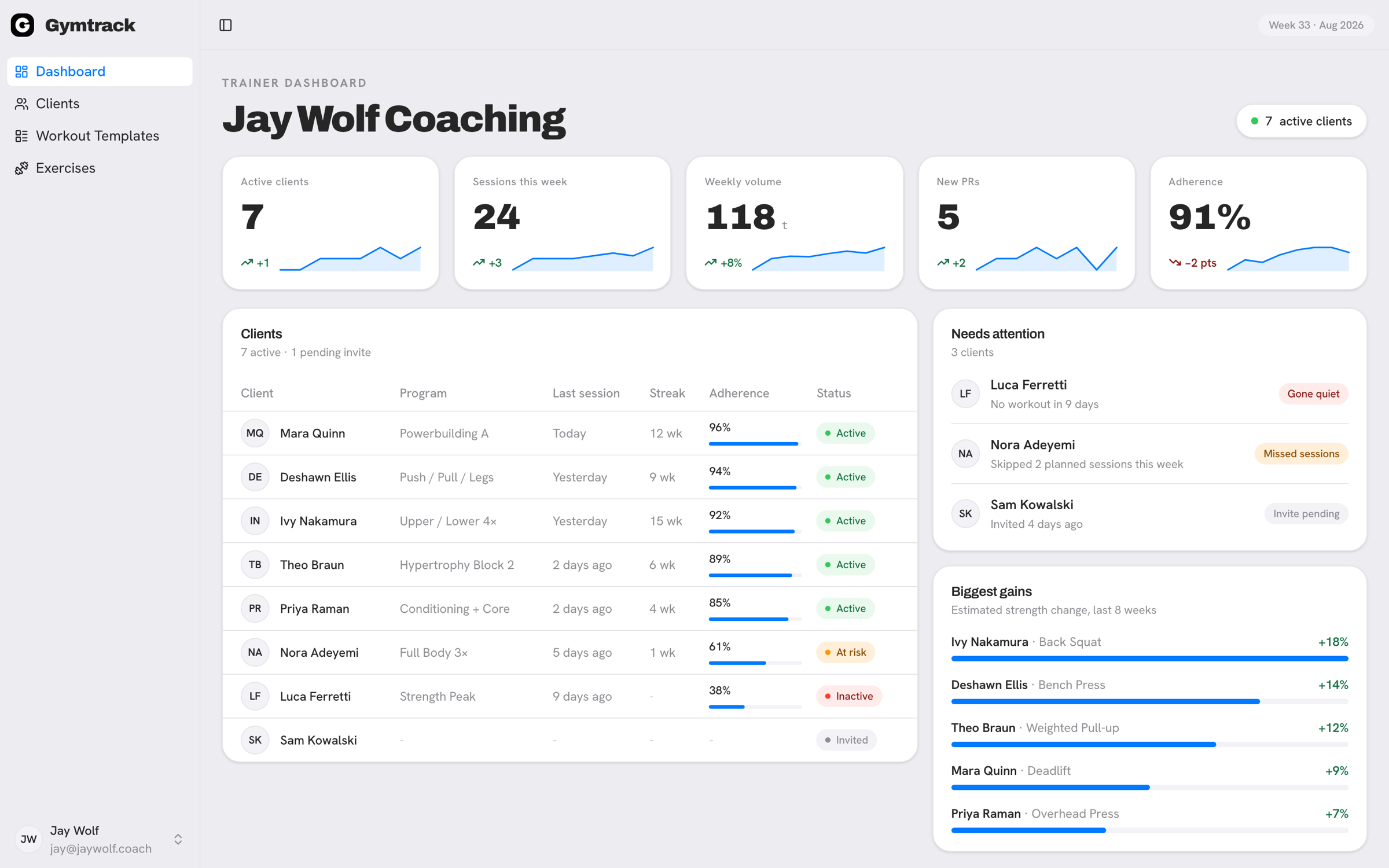
Gymtrack trainer dashboard: client roster with adherence, weekly totals, clients needing attention, and personal records beaten this week
What you get

A coaching cockpit, not a chat thread.

  • Every client’s training, one screen

    Strength, weekly volume, bodyweight, muscle split, personal records and every workout they log - charted automatically as they train, down to the individual set.

  • Open the dashboard, see what changed

    Who needs a nudge and why - never started, gone quiet, invite still pending, with the day count. Plus every workout your clients finished and the records they beat this week.

  • Drill into a single lift

    Pick a client and an exercise: estimated 1RM over 3, 6 or 12 months, their best set, heaviest weight and total volume, and every session that built it.

  • Program every client

    Build workout templates - exercises and per-set targets - and assign them to the clients you coach. They show up in your client’s app without touching their own template limit.

  • Notes that land on their phone

    Write injuries, cues and weekly focus in a real editor - headings, lists, tables - and date it to start whenever you want. Your client reads it in the Gymtrack app.

  • Your whole roster in one table

    Every client, their status and their last workout, in one list. Click through to anyone’s full training history in one step.

How it works

From signup to your first client in four steps.

  1. 01

    Create your trainer account

    Sign up on the web with email, Google or Apple. You don’t need the Gymtrack app to be a trainer - the dashboard runs in any browser.

  2. 02

    Start your free month

    Say how many clients you need, and the dashboard opens straight away. Nothing is charged for the first month, and there is nothing to arrange with us.

  3. 03

    Invite your clients by email

    They install Gymtrack and create their own free account first - an invite only works for an email that already has one. Then send it from your dashboard and they tap Accept under Settings → Trainer requests.

  4. 04

    Coach from their data

    Everything they log lands in your dashboard: workout history, weekly volume, per-exercise progress, and your own notes on each client.

PricingLaunch offer · 20% off

One price. Pay for the roster you have.

Your first 5 clients are $5.60 each. Every client after that is $4. Same dashboard whatever size you are - the bill just follows your roster.

Aspiring Coach

For the roster you’re still building.

$5.60/moRegular price $7

for 1 client

Clients1
15

5 clients comes to $28 a month. Client number 6 and every one after costs $4.

  • $5.60 per client for the first 5
  • Per-client analytics - strength, volume, bodyweight, muscle split, personal records, full history
  • Per-exercise progress for any client, over 3, 6 or 12 months
  • Build & assign workout programs
  • Coaching notes that reach your client’s phone
  • Quiet-client alerts when someone stops training
  • Web dashboard - works in any browser

Starts with one month free - up to 10 clients. Cancel any time.

Best value

Full roster

For a full book of clients.

$32/moRegular price $40

for 6 clients

Works out to $5.33 per client

Clients6
650+

$5.60 each for the first 5, then $4 each

  • $4 per client from number 6 - up to 50
  • Per-client analytics - strength, volume, bodyweight, muscle split, personal records, full history
  • Per-exercise progress for any client, over 3, 6 or 12 months
  • Build & assign workout programs
  • Coaching notes that reach your client’s phone
  • Quiet-client alerts when someone stops training
  • Web dashboard - works in any browser

Starts with one month free - up to 10 clients. Cancel any time.

Your clients train on the free Gymtrack app - they never pay.

Questions, answered.

What do I get for free?

A full month of the whole dashboard. You choose how many clients you need - up to 10 - and you can change it during the month. You add a card to start, nothing is charged until the month is up, and you start it yourself.

How much does it cost?

One price that steps down as you grow: $5.60 per client for your first 5, then $4 for every client after. So 5 clients is $28 a month and 6 is $32. Everything is 20% off the regular price while the launch offer runs.

Which plan should I pick?

Nothing - there is only one subscription. Count the clients you’ll have on the dashboard at once and set that number; you pay nothing for seats you are not using, and you can change the number whenever your roster does. The two cards above are the same price seen from two roster sizes.

Do I need the app? Do my clients?

You don’t - your dashboard is a website and runs in any browser. Your clients do: Gymtrack is a free iPhone app, they log their training there, and that app is where everything on your dashboard comes from.

How do my clients connect to me?

They install Gymtrack and create their own free account first - an invite only works for an email that already has one. You then send the invite from your dashboard, and they tap Accept in the app under Settings → Trainer requests. Gymtrack doesn’t email or notify them, so let them know to open the app after you send it.

What counts as a client seat?

Every open link on your roster - clients who’ve accepted, plus invites still waiting for an answer. An invite takes a seat the moment you send it, and gives it back if you cancel it or the client declines.

What happens to my clients if my access lapses?

Their own training data is never affected - every workout, record and chart stays theirs and stays visible. What does go quiet is the work you did for them: the programs you assigned stop showing in their app until your account is active again. Nothing is deleted, and it all comes back.

Do my clients pay?

No. The Gymtrack app is free for them - only the trainer pays for the dashboard.

Can a client have more than one trainer?

One active trainer at a time. A client can leave and switch to a new trainer whenever they want.

Start coaching on Gymtrack.

Turn every set your clients log into progress you can coach.